

The flow, end to end
1
Connect, and get refused
The Inspector connects to the server URL. The server answers
401. When the
response carries a WWW-Authenticate header, it points at the
protected-resource metadata URL (resource_metadata) and, optionally, the
scopes the request requires.2
Discover the authorization server
The Inspector fetches the server’s protected-resource and
authorization-server
metadata
to learn the endpoints and the supported grants.
3
Register or identify the client
The Inspector identifies itself to the authorization server through
whichever mechanism is configured: dynamic client
registration,
a pre-registered static client (
--client-id / --client-secret), a
Client ID Metadata
Document
(--client-metadata-url), or an enterprise-managed
IdP.4
Authorize in the browser
The Inspector opens the authorization URL. You sign in and consent.
5
Receive the callback
The authorization server redirects to the Inspector’s callback URL, carrying
the authorization code.
6
Exchange and retry
The code is exchanged for tokens, the tokens are persisted, and the original
connect is retried. For a mid-session
challenge, the CLI retries the refused
request automatically, and the web client asks you to retry the action.
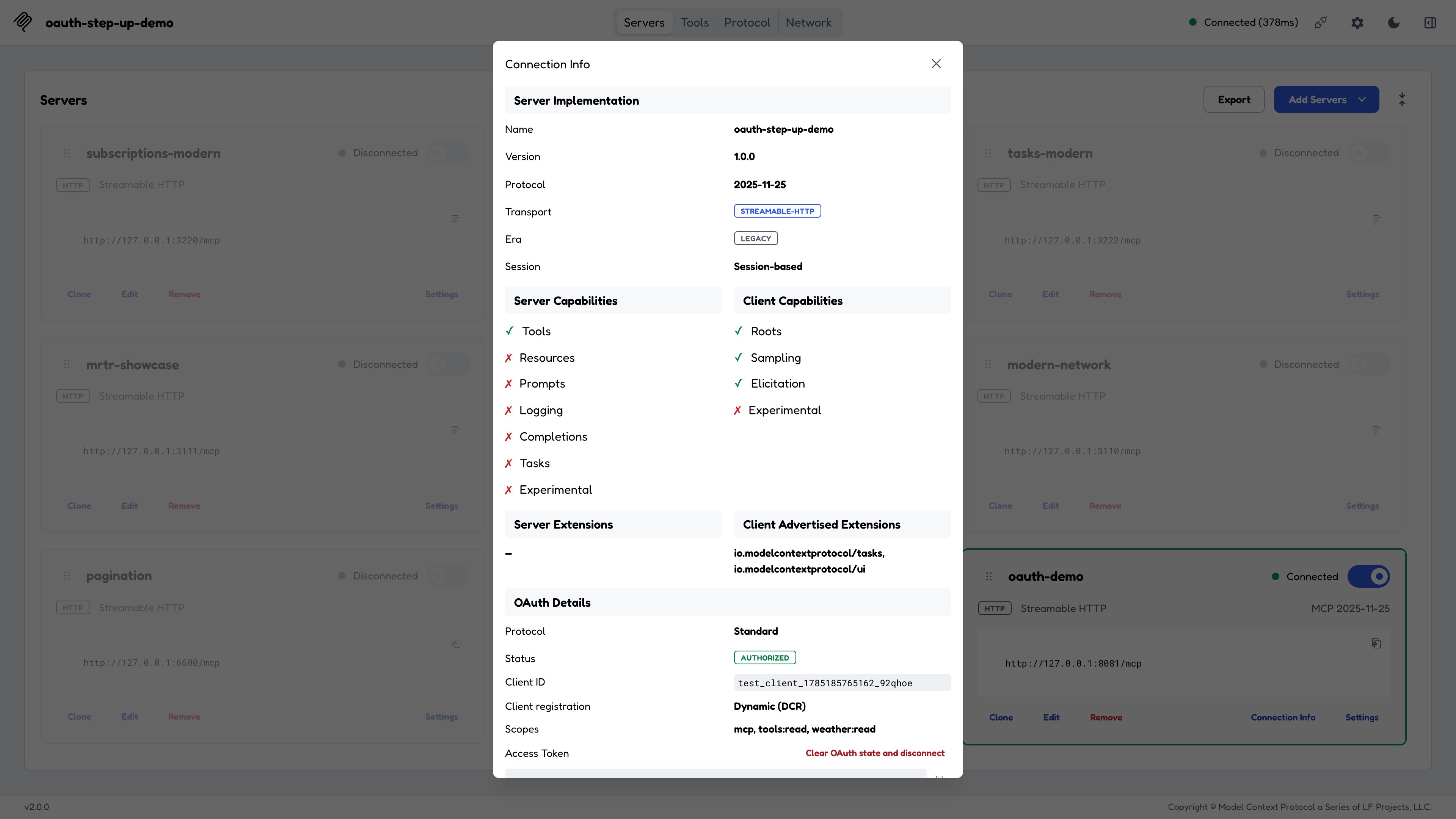
Connection Info after a completed OAuth flow: the authorization status, the dynamically registered client, and the granted scopes.
Callback URLs
The web app listens for the OAuth callback on its own URL, while the CLI and TUI deliberately share a second one:
Register
http://127.0.0.1:6276/oauth/callback on any IdP that requires pre-registered redirect URIs before using the CLI or TUI. A predictable default is the point: you register once and reuse it.
For the CLI and TUI, override it with --callback-url or MCP_OAUTH_CALLBACK_URL. The web callback always follows the page’s origin, so localhost and 127.0.0.1 produce different redirect URIs there too.
Redirect URIs must match your registration exactly.
http://localhost:6276/... and http://127.0.0.1:6276/... are different URIs to an authorization server, even though they reach the same listener.Only one process can hold the default port at a time; a second concurrent flow fails with EADDRINUSE. Use a different fixed port per instance, or http://127.0.0.1:0/oauth/callback for an OS-assigned ephemeral port when your authorization server supports dynamic redirect-URI registration.Where credentials live
The path to
oauth.json is resolved in order: MCP_INSPECTOR_OAUTH_STATE_PATH, then <MCP_STORAGE_DIR>/oauth.json (see Environment variables), then the default above. All three clients resolve it the same way. Command-line --client-id / --client-secret / --client-metadata-url override client.json.
The secrets themselves (access and refresh tokens, client secrets, registration access tokens, and IdP session tokens) are not in oauth.json. They go to the secret store, which is the OS keychain when one is reachable. MCP_INSPECTOR_PERSIST_TOKENS limits which acquired tokens are kept: all (default), access (no refresh tokens), or none (re-authorize every run). See Secret store variables.
Mid-session re-authorization
A server can refuse a single request mid-session with a401 or a 403 insufficient_scope, and the Inspector handles both without dropping the connection:
- Re-authorization: the token expired or was revoked. The Inspector parses the
WWW-Authenticatechallenge and re-runs the flow, then retries the failed request. - Step-up: the request needs scopes the current token doesn’t carry. The Inspector re-authorizes for the union of the held and required scopes, so the new token covers everything the old one did plus the newly required scopes.
403 surfaces as an error instead. In the CLI, step-up prompts on stderr:
echo y | ...), as long as it’s newline-terminated or stdin closes. N, or EOF with no answer, declines. A non-TTY stdin that sends nothing within 5 seconds fails with auth_required, which is distinct from an explicit decline. Enterprise-managed step-up re-mints silently, with no prompt.
Non-interactive and CI runs
Interactive OAuth requires a TTY on stdin or stderr, orMCP_AUTO_OPEN_ENABLED=true. Redirecting stderr into a pipe, as in 2>&1 | tee, still works because stdin stays a TTY. When neither is true, which is the normal CI shape, the CLI fails fast with auth_required rather than waiting up to fifteen minutes for a callback nobody will complete.
For CI, be explicit:
--stored-auth-only never starts interactive OAuth or step-up, never opens a browser, uses the shared store if a token is there, and fails immediately otherwise.
Handing off from the web client to the CLI
The common case: a human completed OAuth in the web Inspector on this machine, and now a script wants to use that token.
A typical remote-VM sequence. It assumes a web Inspector is running on the VM with a known
MCP_INSPECTOR_API_TOKEN, and the same value is exported in the shell below; without it, the handoff’s deepLink carries no autoConnect token and the web client rejects it.
deepLink in the handoff block navigates a browser straight to a connected Inspector; see Deep links.
Because the stored entry records no expiry, a stored refresh token is
exercised on every
--use-stored-auth run. With rotating (single-use)
refresh tokens that opens two narrow failure windows: two concurrent
invocations against the same state file can race for the token, and a crash
between a successful refresh and the write-back leaves the rotated token
unsaved. Both are unlikely; re-authorize in the web client to recover.Inspecting auth state
- Web: the Connection Info panel shows the authorization status, the client registration type, the client ID, granted scopes, and the access token, and offers Clear OAuth state and disconnect for the active server. Clearing also revokes the grant unless the server’s Revoke tokens on clear setting is off.
- TUI: the Auth tab (
a) shows the same fields and clears state the same way. - CLI:
--list-stored-authshows what’s on disk, and--reloginrevokes and discards it and starts over.